# Configuración de plantillas OCR

# Crear nueva plantilla

<p class="callout info">**<span style="color: rgb(55, 65, 81); font-family: Söhne, ui-sans-serif, system-ui, -apple-system, 'Segoe UI', Roboto, Ubuntu, Cantarell, 'Noto Sans', sans-serif, 'Helvetica Neue', Arial, 'Apple Color Emoji', 'Segoe UI Emoji', 'Segoe UI Symbol', 'Noto Color Emoji'; font-size: 16px; font-style: normal; font-variant-ligatures: normal; font-variant-caps: normal; font-weight: 400; letter-spacing: normal; orphans: 2; text-align: start; text-indent: 0px; text-transform: none; widows: 2; word-spacing: 0px; -webkit-text-stroke-width: 0px; white-space: pre-wrap; text-decoration-thickness: initial; text-decoration-style: initial; text-decoration-color: initial; display: inline !important; float: none;"><span style="color: rgb(31, 31, 31); font-family: 'Google Sans', arial, sans-serif; font-size: 28px; font-style: normal; font-variant-ligatures: normal; font-variant-caps: normal; font-weight: 400; letter-spacing: normal; orphans: 2; text-align: start; text-indent: 0px; text-transform: none; widows: 2; word-spacing: 0px; -webkit-text-stroke-width: 0px; white-space: normal; background-color: rgb(255, 255, 255); text-decoration-thickness: initial; text-decoration-style: initial; text-decoration-color: initial; display: inline !important; float: none;">paso 1:<span style="color: rgb(55, 65, 81); font-family: Söhne, ui-sans-serif, system-ui, -apple-system, 'Segoe UI', Roboto, Ubuntu, Cantarell, 'Noto Sans', sans-serif, 'Helvetica Neue', Arial, 'Apple Color Emoji', 'Segoe UI Emoji', 'Segoe UI Symbol', 'Noto Color Emoji'; font-size: 16px; font-style: normal; font-variant-ligatures: normal; font-variant-caps: normal; font-weight: 400; letter-spacing: normal; orphans: 2; text-align: start; text-indent: 0px; text-transform: none; widows: 2; word-spacing: 0px; -webkit-text-stroke-width: 0px; white-space: pre-wrap; text-decoration-thickness: initial; text-decoration-style: initial; text-decoration-color: initial; display: inline !important; float: none;">En el primer paso, nos dirigimos a la plantilla que deseamos editar desde el menú de "Plantillas OCR".y oprimimos el icono de <span style="color: rgb(77, 81, 86); font-family: arial, sans-serif; font-size: 14px; font-style: normal; font-variant-ligatures: normal; font-variant-caps: normal; font-weight: 400; letter-spacing: normal; orphans: 2; text-align: left; text-indent: 0px; text-transform: none; widows: 2; word-spacing: 0px; -webkit-text-stroke-width: 0px; white-space: normal; background-color: rgb(255, 255, 255); text-decoration-thickness: initial; text-decoration-style: initial; text-decoration-color: initial; display: inline !important; float: none;">lápiz</span> </span> .  
</span></span>**</p>

 [![image.png](https://read.pygateway.com/uploads/images/gallery/2023-12/scaled-1680-/p7yimage.png)](https://read.pygateway.com/uploads/images/gallery/2023-12/p7yimage.png)

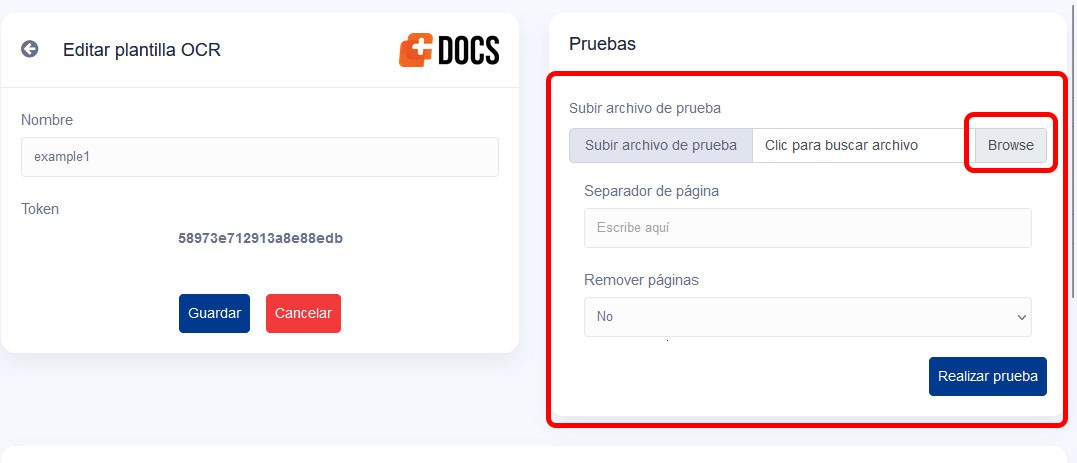
**paso 2:<span style="color: rgb(55, 65, 81); font-family: Söhne, ui-sans-serif, system-ui, -apple-system, 'Segoe UI', Roboto, Ubuntu, Cantarell, 'Noto Sans', sans-serif, 'Helvetica Neue', Arial, 'Apple Color Emoji', 'Segoe UI Emoji', 'Segoe UI Symbol', 'Noto Color Emoji'; font-size: 16px; font-style: normal; font-variant-ligatures: normal; font-variant-caps: normal; font-weight: 400; letter-spacing: normal; orphans: 2; text-align: start; text-indent: 0px; text-transform: none; widows: 2; word-spacing: 0px; -webkit-text-stroke-width: 0px; white-space: pre-wrap; text-decoration-thickness: initial; text-decoration-style: initial; text-decoration-color: initial; display: inline !important; float: none;"><span style="color: rgb(31, 31, 31); font-family: 'Google Sans', arial, sans-serif; font-size: 28px; font-style: normal; font-variant-ligatures: normal; font-variant-caps: normal; font-weight: 400; letter-spacing: normal; orphans: 2; text-align: start; text-indent: 0px; text-transform: none; widows: 2; word-spacing: 0px; -webkit-text-stroke-width: 0px; white-space: normal; background-color: rgb(255, 255, 255); text-decoration-thickness: initial; text-decoration-style: initial; text-decoration-color: initial; display: inline !important; float: none;"><span style="color: rgb(55, 65, 81); font-family: Söhne, ui-sans-serif, system-ui, -apple-system, 'Segoe UI', Roboto, Ubuntu, Cantarell, 'Noto Sans', sans-serif, 'Helvetica Neue', Arial, 'Apple Color Emoji', 'Segoe UI Emoji', 'Segoe UI Symbol', 'Noto Color Emoji'; font-size: 16px; font-style: normal; font-variant-ligatures: normal; font-variant-caps: normal; font-weight: 400; letter-spacing: normal; orphans: 2; text-align: start; text-indent: 0px; text-transform: none; widows: 2; word-spacing: 0px; -webkit-text-stroke-width: 0px; white-space: pre-wrap; text-decoration-thickness: initial; text-decoration-style: initial; text-decoration-color: initial; display: inline !important; float: none;">Posteriormente, seleccionamos el archivo o imagen deseado y seleccionamos " realizar prueba" para asegurarnos de que se haya cargado correctamente.</span></span></span>**

[![select.jpg](https://read.pygateway.com/uploads/images/gallery/2023-12/scaled-1680-/select.jpg)](https://read.pygateway.com/uploads/images/gallery/2023-12/select.jpg)

**paso 3:**posterior mente seleccionamos nuestros token los token sirven para encontrar informacion de nuestro archivo o imagen existe 2 tipos de tokens lo podemos encontrar por palabra clave string o por expresion regular

[![select1.jpg](https://read.pygateway.com/uploads/images/gallery/2023-12/scaled-1680-/select1.jpg)](https://read.pygateway.com/uploads/images/gallery/2023-12/select1.jpg)
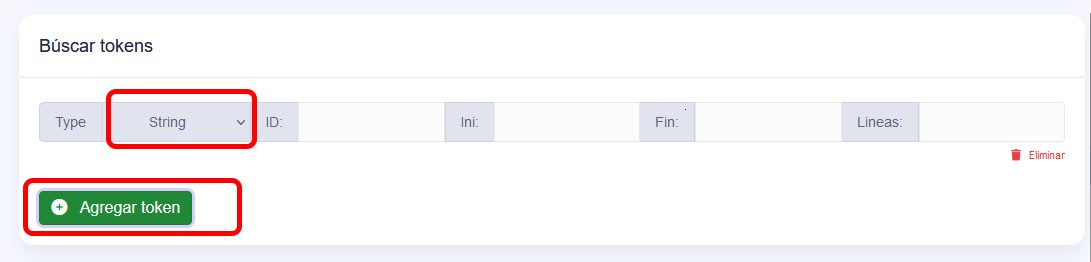
- **string**: posteriormente necesitamos llenar la informaccion de nuestro token para esto necesiamos mirar nuestro documento o imagen a la cual deseamos extraer informacion como ejemplo un numero de telefono [![image.png](https://read.pygateway.com/uploads/images/gallery/2023-12/scaled-1680-/tvyimage.png)](https://read.pygateway.com/uploads/images/gallery/2023-12/tvyimage.png)

    
    <span style="color: rgb(55, 65, 81); font-family: Söhne, ui-sans-serif, system-ui, -apple-system, 'Segoe UI', Roboto, Ubuntu, Cantarell, 'Noto Sans', sans-serif, 'Helvetica Neue', Arial, 'Apple Color Emoji', 'Segoe UI Emoji', 'Segoe UI Symbol', 'Noto Color Emoji'; font-size: 16px; font-style: normal; font-variant-ligatures: normal; font-variant-caps: normal; font-weight: 400; letter-spacing: normal; orphans: 2; text-align: start; text-indent: 0px; text-transform: none; widows: 2; word-spacing: 0px; -webkit-text-stroke-width: 0px; white-space: pre-wrap; text-decoration-thickness: initial; text-decoration-style: initial; text-decoration-color: initial; display: inline !important; float: none;">Para empezar, es fundamental definir el identificador único de nuestro dato, como en el ejemplo del teléfono. A continuación, observamos que el sistema comienza a capturar los datos después del indicador específico, por ejemplo, "(Teléfono:)", y a partir de ese punto recoge la información. En el mismo renglón, no hay más datos, por lo que consideramos el final hasta el salto de línea, representado por "\\n".</span>
    
    [![image.png](https://read.pygateway.com/uploads/images/gallery/2023-12/scaled-1680-/oI5image.png)](https://read.pygateway.com/uploads/images/gallery/2023-12/oI5image.png)
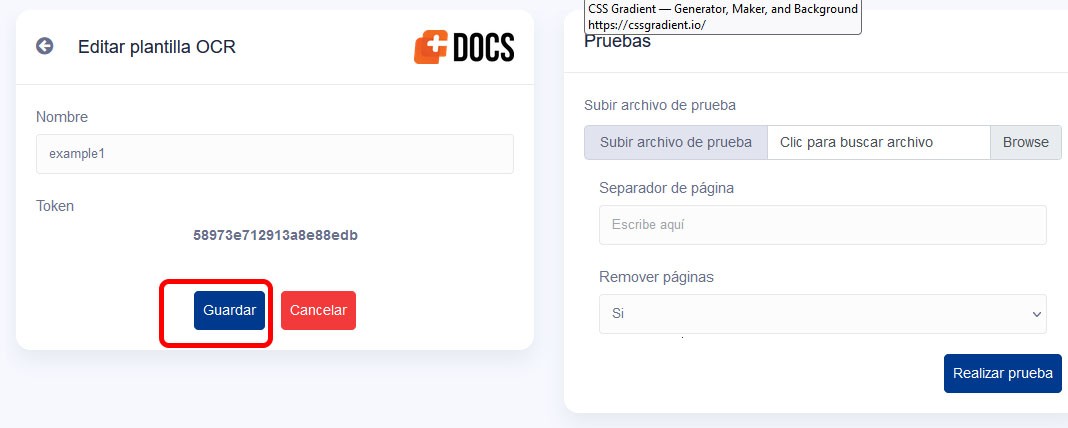
- posteriormente guardamos los cambios para poder hacer una prueba. [![save.jpg](https://read.pygateway.com/uploads/images/gallery/2023-12/scaled-1680-/save.jpg)](https://read.pygateway.com/uploads/images/gallery/2023-12/save.jpg)
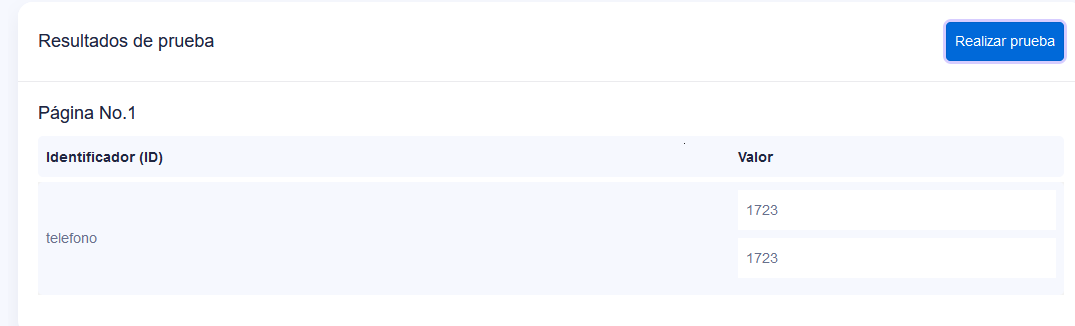
- <span style="color: rgb(55, 65, 81); font-family: Söhne, ui-sans-serif, system-ui, -apple-system, 'Segoe UI', Roboto, Ubuntu, Cantarell, 'Noto Sans', sans-serif, 'Helvetica Neue', Arial, 'Apple Color Emoji', 'Segoe UI Emoji', 'Segoe UI Symbol', 'Noto Color Emoji'; font-size: 16px; font-style: normal; font-variant-ligatures: normal; font-variant-caps: normal; font-weight: 400; letter-spacing: normal; orphans: 2; text-align: start; text-indent: 0px; text-transform: none; widows: 2; word-spacing: 0px; -webkit-text-stroke-width: 0px; white-space: pre-wrap; text-decoration-thickness: initial; text-decoration-style: initial; text-decoration-color: initial; display: inline !important; float: none;">Luego, presionamos "Realizar Prueba" y podemos observar los datos capturados por nuestro software.</span>

[![image.png](https://read.pygateway.com/uploads/images/gallery/2023-12/scaled-1680-/sWBimage.png)](https://read.pygateway.com/uploads/images/gallery/2023-12/sWBimage.png)

- **regex:**Es el mismo caso que string pero en este caso por expresiones regulares se inicia y se termina en otra expresion regular ejemplo:

[![image.png](https://read.pygateway.com/uploads/images/gallery/2023-12/scaled-1680-/bM6image.png)](https://read.pygateway.com/uploads/images/gallery/2023-12/bM6image.png)

- Como podemos notar, la secuencia inicia con la expresión regular "/Tipo:/" y concluye con la expresión regular "/Referencia:/".
    
    <div class="w-full pt-2 md:pt-0 dark:border-white/20 md:border-transparent md:dark:border-transparent md:w-[calc(100%-.5rem)]" style="border: 0px solid transparent; box-sizing: border-box; --tw-border-spacing-x: 0; --tw-border-spacing-y: 0; --tw-translate-x: 0; --tw-translate-y: 0; --tw-rotate: 0; --tw-skew-x: 0; --tw-skew-y: 0; --tw-scale-x: 1; --tw-scale-y: 1; --tw-scroll-snap-strictness: proximity; --tw-ring-offset-width: 0px; --tw-ring-offset-color: #fff; --tw-ring-color: rgba(69,89,164,.5); --tw-ring-offset-shadow: 0 0 transparent; --tw-ring-shadow: 0 0 transparent; --tw-shadow: 0 0 transparent; --tw-shadow-colored: 0 0 transparent; width: calc(100% - 0.5rem); padding-top: 0px; color: rgb(0, 0, 0); font-family: Söhne, ui-sans-serif, system-ui, -apple-system, 'Segoe UI', Roboto, Ubuntu, Cantarell, 'Noto Sans', sans-serif, 'Helvetica Neue', Arial, 'Apple Color Emoji', 'Segoe UI Emoji', 'Segoe UI Symbol', 'Noto Color Emoji'; font-size: medium; font-style: normal; font-variant-ligatures: normal; font-variant-caps: normal; font-weight: 400; letter-spacing: normal; orphans: 2; text-align: start; text-indent: 0px; text-transform: none; widows: 2; word-spacing: 0px; -webkit-text-stroke-width: 0px; white-space: normal; text-decoration-thickness: initial; text-decoration-style: initial; text-decoration-color: initial;"><form class="stretch mx-2 flex flex-row gap-3 last:mb-2 md:mx-4 md:last:mb-6 lg:mx-auto lg:max-w-2xl xl:max-w-3xl" style="border: 0px solid rgb(217, 217, 227); box-sizing: border-box; --tw-border-spacing-x: 0; --tw-border-spacing-y: 0; --tw-translate-x: 0; --tw-translate-y: 0; --tw-rotate: 0; --tw-skew-x: 0; --tw-skew-y: 0; --tw-scale-x: 1; --tw-scale-y: 1; --tw-scroll-snap-strictness: proximity; --tw-ring-offset-width: 0px; --tw-ring-offset-color: #fff; --tw-ring-color: rgba(69,89,164,.5); --tw-ring-offset-shadow: 0 0 transparent; --tw-ring-shadow: 0 0 transparent; --tw-shadow: 0 0 transparent; --tw-shadow-colored: 0 0 transparent; margin-left: auto; margin-right: auto; display: flex; flex-direction: row; gap: 0.75rem; max-width: 48rem;"><div class="relative flex h-full flex-1 items-stretch md:flex-col" style="border: 0px solid rgb(217, 217, 227); box-sizing: border-box; --tw-border-spacing-x: 0; --tw-border-spacing-y: 0; --tw-translate-x: 0; --tw-translate-y: 0; --tw-rotate: 0; --tw-skew-x: 0; --tw-skew-y: 0; --tw-scale-x: 1; --tw-scale-y: 1; --tw-scroll-snap-strictness: proximity; --tw-ring-offset-width: 0px; --tw-ring-offset-color: #fff; --tw-ring-color: rgba(69,89,164,.5); --tw-ring-offset-shadow: 0 0 transparent; --tw-ring-shadow: 0 0 transparent; --tw-shadow: 0 0 transparent; --tw-shadow-colored: 0 0 transparent; position: relative; display: flex; height: 54.4922px; flex: 1 1 0%; align-items: stretch; flex-direction: column;"><div class="flex w-full items-center" style="border: 0px solid rgb(217, 217, 227); box-sizing: border-box; --tw-border-spacing-x: 0; --tw-border-spacing-y: 0; --tw-translate-x: 0; --tw-translate-y: 0; --tw-rotate: 0; --tw-skew-x: 0; --tw-skew-y: 0; --tw-scale-x: 1; --tw-scale-y: 1; --tw-scroll-snap-strictness: proximity; --tw-ring-offset-width: 0px; --tw-ring-offset-color: #fff; --tw-ring-color: rgba(69,89,164,.5); --tw-ring-offset-shadow: 0 0 transparent; --tw-ring-shadow: 0 0 transparent; --tw-shadow: 0 0 transparent; --tw-shadow-colored: 0 0 transparent; display: flex; width: 767.988px; align-items: center;"></div></div></form></div>

[![image.png](https://read.pygateway.com/uploads/images/gallery/2023-12/scaled-1680-/PPqimage.png)](https://read.pygateway.com/uploads/images/gallery/2023-12/PPqimage.png)

 Respuesta

[![image.png](https://read.pygateway.com/uploads/images/gallery/2023-12/scaled-1680-/pJTimage.png)](https://read.pygateway.com/uploads/images/gallery/2023-12/pJTimage.png)